Showing posts with label Phones. Show all posts

Wednesday, 2 January 2013

Ebayers - Must read 2


Step 3: Bidding tips to bag a bargain
Once you’ve spotted listing you like, it’s time to bid right and close the deal.

  • Snipe your way to a bargain
    Spotted something you want to buy? The last thing you should ever do is bid on it! Bid early and competing buyers will bid back, forcing the price upwards. Instead, sneakily win auctions by swooping in and delivering a killer bid about 10 seconds before, leaving no time for others to fight back.

    Sniping websites automatically bid on your behalf. Here, you simply sign up, enter an eBay* item number and the highest price you’re willing to pay (this also stops you getting carried away in the heat of a last minute bidding war). Goofbay.com has a free auction sniper, or alternatively, the more reliable Bidnip.com charges roughly 35 cents (17p) per auction won.
    A big warning! You need to give these sites your eBay password for them to work, which is a serious security concern. While feedback has generally been good from MoneySavers, there's little protection from eBay if things ever do go wrong, as you have willingly given your password to a third party. If you do sign up, never use the name password for eBay as you do for other accounts like banks or email.
  • Manipulate eBay ‘best offers’
    Some sellers specify that they’ll consider ‘best offers’. This is where you propose a figure, then they mull it over and tell you if it’s a goer. Yet, because sellers often sell the same item repeatedly, especially electricals, there’s a loophole to see which prices they’ve already accepted, and lower your best offer accordingly.
    To do this, click on “advanced search”, tell it what you want, and check the show only “best offers” box. Once you’ve found a product which accepts best offers, click to view the sellers other items, on the top right hand side of the page. On the next page, click “completed items”, to see all the items that seller has already sold. Look at the items that say best offer by it, and, bingo: you can see the lowest price they’ve accepted.
  • Arrange your own postage
    Some sellers try to supplement their income by charging excessive delivery rates. If this happens, ask if you can arrange your own postage. Then have a courier pick up the item and deliver it to your house. For a full guide to this and finding a mega-cheap courier, read the Cheap Parcel Delivery article.

Step 4: Scam busting tips
In it’s essence, eBay’s a simple marketplace and it takes only limited responsibility for what goes on there. This means that, while it's easy to snap up a scorcher, it's just as easy to get burnt.
If you’re new to eBay, it’s a good idea to learn the ropes by making a couple of small purchases, such as books or CDs, before graduating to more costly items. The following should help you avoid common cons.
  • Check you're bidding on the item itself.
    While scare con stories of ebay are abound, with a bit of common sense, it’s fairly easy to stay safe. Most sellers are decent types, who want to protect their feedback scores. If you’re new to eBay and want to check whether an item’s legit, why not post it on the eBay board, where experts will tell you whether it looks kosher.
    Sometimes it seems you're bidding for an object on eBay*, when all that's actually up for grabs is a link to a site selling it. E.g. it only takes a few minutes after logging onto eBay to find a link to a £200 laptop sale, where inspection of the small print reveals it's actually selling a link to a discount laptop site.
    Always read the whole description in detail before bidding. Often the catch is hidden in the tiny text at the end – an attempt to protect the seller from any comeback.
  • Know your rights.
    Use the 'Buy It Now' button, rather than a standard auction, to buy from a UK based trader on eBay, and you've all the same statutory rights as buying from a shop (see the Consumer Rights article). A trader is someone who makes some or all of their living from regularly selling goods. Technically it's up to the courts to decide but it's usually pretty obvious.
    Buy from a private individual and the law says “let the buyer beware”. Providing your purchase arrives ‘as described' there's little legal comeback (assuming you can trace them anyway) and the standard seven day internet cooling-off period usually doesn't apply to auction purchases.
  • Take feedback with dose of skepticism.
    eBay sellers have a ‘feedback' rating which acts as a useful guide to whether they've dealt fairly in the past. As a guideline, look for a seller with over 98% positive feedback, and a high feedback score of at least 30. Never buy an expensive item from a seller with zero feedback, as it means they’ve never sold before.
    Remember that feedback is useful but not infallible. One thing to watch for is traders flogging a few tiny things for 10p each to build their feedback, and suddenly listing 15 mobile phones at £200 a pop.
    Normally, viewing a sellers’ negative feedback means trawling through reams of comments, but a handy tool lets you view it instantly. Just in a seller name into negative feedback checker Toolhaus, and it’ll expose all the negative/neutral comments.

eBay is not the only site
While eBay is hugely dominant, there are alternatives which can yield decent bargains.
  • Free Classified Ads
    Perhaps the fasted growing trend is for offloading gear on a free classified site, the power-puncher of these is Gumtree* which divides the UK into different towns. It sells anything from bikes to beds and doesn't charge either the buyer or the seller (except for job ads).
    Interestingly Gumtree is owned by eBay, it was bought in May 2005, probably as eBay started to identify it as competition. Thankfully it hasn't impacted its free community-based operations.
  • Other Auction Sites
    While eBay is massively dominant ebid* is also a sizeable auction site. Its advantage is it charges sellers less than eBay, which means some prefer it. So if you're searching for something specific, it's worth adding it to your search. A useful website, auctionlotwatch.co.uk is a shopbot for online auctions. Search for an item and it trawls the four big auction sites for you.
  • Amazon & Play
    Amazon* and now Play* have second hand marketplaces, for most of the products they sell new, and these can actually hold a candle to eBay's size. Do a normal search for something on the site, and if there's a second hand version available, it's listed. It primarily operates as a fixed price rather than an auction, making it an easy alternative.

Get it for free!

It’s even possible to bagsy stuff for free. There are several environmentally friendly and cheap alternative to auctions sites, where users give away items they no longer want. The idea's that folks ‘recycle' goods they'd otherwise have thrown out; some of the stuff is junk, some are top notch goods from generous people. For a step-by-step guide on give-away websites, including Freecycle and others, showing how to use them best, read the Freecycle guide.
 
Credits: Moneysavingexperts


Tuesday, 1 January 2013

Top 5 phones to buy 2013


1. Apple iPhone 5


Apple’s iPhone 5 is an amazing performer with great battery life wrapped in a delicious shell. It’s a top-shelf device. Performance and battery life Two times faster? Twice the graphics performance? Better battery life? Actually, yes. The iPhone 5 over-delivers on all those promises. Running the Geekbench test suite on the iPhone 4S gave us an average score of 634. The iPhone 5 netted an average of 1,628

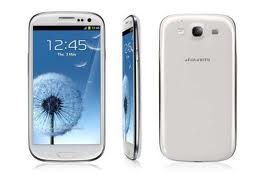
2. Samsung Galaxy S III


With the Samsung Galaxy S III (S3), Samsung has completed it again. For the third consecutive year, its flagship Galaxy cellphone is a tidy package deal of top-flight specs, approachable design, regular efficiency, and compelling pricing. Beginning its U.S. gross sales debut with 5 carriers — Verizon, AT&T, Sprint, T-Mobile, and U.S. Cellular — makes this smartphone almost ubiquitous.

3. HTC Droid DNA


HTC Droid DNA beautifully designed HTC Droid DNA features a quad-core processor, Android 4.1 Jelly Bean, 4G LTE, a sharp 5-inch screen, an excellent camera, and long battery life. Design Measuring 5.5 x 2.7 x 0.38 inches and weighing 5 ounces, the DNA is narrower than the Samsung Galaxy S III, but not as thin or light (5.4 x 2.8 x 0.3 inches, 4.7 ounces). This HTC is certainly easier to use with one hand than the freakishly largeGalaxy Note II (5.9 x 3.2 x 0.37 inches).

4. Motorola Droid Razr Maxx


Motorola’s celebrating an important milestone with Motorola Atrix HD: it’s the company’s first smartphone to ship with Ice Cream Sandwich already on board. The question is, will it be roughly the same user experience as we’ve already seen on the Droid RAZR and RAZR Maxx? How much of an impact did AT&T have on the firmware this time around?. Motorola Atrix HD continues this trend; there’s nothing terribly wrong with this 8-megapixel shooter, but it’s hardly a bellwether for newer devices…

5. Nokia Lumia 920


The Nokia Lumia 920 forges new Windows Phone ground with wi-fi charging assist and a highly sensitive display you need to use with gloves. Moreover, Nokia helps fill in Windows Phone OS gaps with just a few missing features. The Nokia Lumia 920 is the flagship handset from the Finnish firm, however it’s no longer Microsoft’s darling gadget, with the HTC 8X chosen because the signature windows Cellphone 8 handset.

Courtesy: technomild & Google pics

Mobile phone buyers uk read this before
Expensive Mobile phones in the world


Sunday, 30 December 2012

Mobile phone buyers UK - Read this before you buy - 2


Smart phone operating systems
Here's a quick run-down of the main operating systems currently doing the rounds.

iOS
iOS is the software that Apple uses on the iPhone, as well as the iPad and iPod touch. When it was introduced on the original iPhone, iOS was revolutionary, as it was designed from the ground up to be driven via finger presses, rather than the styluses that were commonly used to navigate around previous smart phones.

What really sets iOS apart from the crowd is the intuitive design of its user interface. Most people can simply pick up an iPhone and start using it, without having to refer to a manual.

Apple has added numerous features to iOS over the years, including multitasking support -- so you can run more than one application at a time -- and cut and paste features for text editing. The iPhone's App Store has also been a huge success, offering thousands of applications to download, ranging from games to recipe apps.

iOS is still the gold standard for mobile operating systems. But the iPhone is a premium product and the latest version of the handset costs more than £500 SIM-free.
Android

Android is Google's mobile operating system. Although Google created the software, it's offered for free to mobile phone manufacturers, and now many of the big names, including HTC, Motorola, Samsung and LG, produce smart phones that use Android.
Android handsets actually now outsell the iPhone.

This is partly because there are simply more Android models on the market, but it's also because many of them are considerably cheaper than the iPhone. Prices typically start at around £100 on pay as you go.

Like iOS, Android has an intuitive touchscreen interface and offers advanced features, such as multitasking and live widgets, which you can place on the home screen. The software also provides access to the Android Market, from which you can buy and download apps. While the Market isn't yet as jam-packed as Apple's App Store, it isn't that far behind either.

BlackBerry OS

RIM's BlackBerry OS is only available on the company's BlackBerry range of smart phones. One of the key features of the OS is the way it handles push email. Basically, this means that new messages are pushed out to the phone as soon as they arrive in the user's inbox, rather than waiting for the inbox to refresh itself.

Push email has made BlackBerry phones hugely popular among business users, but cheaper models, such as those in the Curve range, have also started appearing on pay as you go deals aimed at consumers. These cheaper phones, combined with the Messenger app, which allows people to send instant messages for free to other BlackBerry handsets, has made the BlackBerry line popular among rioters youngsters.

The BlackBerry OS wasn't originally designed for touch input. Despite being upgraded to support touch in the last few years, BlackBerry devices still aren't as intuitive as Android or iOS devices. Nevertheless, a completely new version of the OS is in the works, based on the finger-friendly software of the BlackBerry PlayBook tablet. Phones running this OS are expected to arrive in 2012.
Windows Phone 7


Microsoft has been tinkering around with smart phones since way back in 2001, when it introduced Pocket PC. But, although Pocket PC and its later incarnation, Windows Mobile, were packed with features, they were also clunky and difficult to use.

Finally, after the release of Windows Mobile 6.5, Microsoft decided to change tack and create a completely new mobile OS that would be better able to compete with iOS and Android. Windows Phone 7 debuted to surprisingly warm reviews in 2010, but has struggled to gain much market share, despite companies such as HTC, Samsung and LG producing Windows Phone devices.

The software may still have a bright future ahead of it, though. Nokia and Microsoft have signed a deal that will see Nokia start using the operating system on its smart phones towards the tail end of this year. Nokia is waiting for the new release of the OS, code-named Mango, before releasing its own Windows Phone 7 mobiles.

Symbian
Symbian was jointly created by a number of mobile-phone companies, including Nokia and Sony Ericsson. The other backers gradually pulled out, though, leaving Nokia with overall control of the OS. It's found on a range of Nokia devices, including the popular N series phones.

Symbian was originally developed for use with a stylus. Despite tweaks over the years to make it more finger-friendly, it's not as intuitive as newer operating systems, such as iOS and Android. Recently, Nokia has decided to phase out development of Symbian as it switches to Microsoft's Windows Phone 7 platform.

Bada
Bada is an operating system that Samsung developed for use on its touchscreen mobile phones. First appearing on the Samsung Wave, it looks similar to iOS, Android and Windows Phone 7 but doesn't offer the same degree of functionality. Samsung reportedly plans to make the software open source in the near future, so that other companies can use Bada on their devices.

Ask your friends

Our reviews can tell you everything about a phone, from its appearance to its battery life, but we can't come to the pub with you to chat about your new device. That's why it can be a good idea to get a phone that uses the same OS as some of your friends' blowers.

That way, you can swap tips and app recommendations, as well as play games together across the same platforms. Plus, your chums are more likely to have the right charger handy if you have a battery emergency.

Keep your number

If you're moving between networks, you no longer have to switch telephone numbers. Since 2003, the telecoms regulator, Ofcom, has stipulated that all mobile users are entitled to take their number with them when they change networks.

To move your phone number from one network to another, you simply need to call up your existing operator and ask for your Port Authorisation Code, or PAC number for short. You then give this PAC code to the operator that you're switching to and your number will be transferred across to your new network.

Courtesy: cnet.co.uk


Mobile phone buyers UK - Read this before you buy - 1

Getting your mobile phone

There are three main ways to buy a mobile phone in the UK. Many people get their phone on a contract, as part of which the handset is usually free or heavily subsidised by the network operator. The contract means they have to pay a set fee every month.
 
Alternatively, you can choose to purchase a phone on a pay as you go deal. You tend to have to pay the full cost of the phone up front, and then buy top-ups to use the operator's network. These top-ups include a set number of call minutes, text messages or megabytes of data downloads.
 
Finally, some people purchase their phone outright as a SIM-free device. This means it's not tied into a network, and the user is free to put any operator's SIM in the phone.
 
The biggest decision for many people will be whether to opt for a pay as you go deal or sign up for a contract. Both options have plus and minus points, so let's look at them in more detail.

Contract deals

On a contract, you enter into an agreement with a mobile operator to pay a fixed amount every month over the duration of the contract, which usually lasts between 12 and 24 months. In return, you get a fixed amount of call minutes, text messages and data allowance that you can use each month.
 
 
You also usually get either a free handset or a substantial discount on the full cost of a phone. As a rough guide, if you spend over £10 per month on mobile calls, data and text, then you'll get better value from a contract than a pay as you go deal.
 
That said, there are a number of things to be aware of when choosing a contract. For example, mobile-phone companies want to retain their customers for as long as possible, so often they offer incentives for you to sign up to longer contracts.
 
Typically, you can save between £5 and £10 per month by opting for an 18-month or 24-month contract, rather than a shorter 12-month contract. But 24 months is a long time in the world of mobile phones and prices can change rapidly, so what seemed like a great deal at the start of your contract can look very overpriced towards the end of it.
 
Also, the price of your contract won't just depend on the number of minutes, texts and megabytes of data included in your monthly allowance. It'll also be greatly influenced by the handset that you choose as part of the deal.
 
There's a big difference between the price of an entry-level feature phone and a top-end handset like the iPhone 4 or Samsung Galaxy S2. The former will cost around £60, while the latter two are nearer the £500 mark. As a result, if you opt for a higher-end phone, you can expect to pay a higher monthly fee or receive a less generous calls and text package for your money.
 
Remember that you can also contribute towards the cost of your phone in a one-off payment in exchange for a lower monthly bill. In fact, you will usually end up paying far more for a free phone over the course of a 24-month contract than you would if you paid more cash up front and went for a lower monthly bill.
 
If your budget is tight, you may need to lower your expectations as to which handset you can get for free with your contract. Probably the best way to approach the issue is to first decide roughly how much you want to spend per month, and then shop around to find the best compromise between the quality of the handset and the call and data allowance included in the contract.
 
Whether you're upgrading or joining a new network, you can often get a better deal, with more minutes or texts, just by asking. So get some snacks and ring up prepared to do battle. If you have a good offer from a network but it doesn't have the phone you want, try to get another network that does stock your desired phone to match the offer.
 
If you can't be bothered to waste time negotiating, try using an online comparison service such as BillMonitor to trawl through the myriad deals available. BillMonitor can even analyse your existing online bills and recommend the best deals for you.

SIM-only deals

If you're happy with your current mobile phone and are about to come to the end of your contract, it might be worth investigating SIM-only deals.
 
Pretty much all standard contracts include costs associated with subsidising the price of your new handset. Essentially, it's like paying off a loan, except the loan costs are bundled into your monthly contract fee.
 
If you opt for a SIM-only deal, you're essentially stripping out this loan cost, as you'll be using your existing handset or choosing to buy a SIM-free phone yourself, rather than using one that your operator provides.
 
Note that buying a SIM-free phone and then signing up to a SIM-only deal will often prove cheaper in the long term than signing up to a contract.
 
All the major networks now offer SIM-only deals, with prices starting as low as £10 per month. If you're willing to keep your existing mobile, SIM-only deals can be a great way to cut down on your mobile-phone bills, especially as many of these deals only tie you in for one month. Note, though, that the best rates are usually offered on 12-month contracts.

Pay as you go deals

If you don't use your mobile all that often, or just want to be able to tightly regulate how much you're spending, then opting for a pay as you go deal may be the best choice for you.
On pay as you go, you usually buy your phone up front and then purchase call minutes in set blocks, usually referred to as 'top-ups'. Essentially, you pay for calls before you make them by putting money into your mobile phone account. Once you reach the limit of your account, you can't make any more calls or send any more text messages until you top up the account again.
 
You can buy top-ups from a range of places, including local shops and cash machines. Alternatively, you can buy them online or over the phone from your operator.
 
Call charges and data bundles are usually more expensive for pay as you go users than they are for those with contracts, so, if you spend more than £10 per month, you're likely to be better off opting for a contract deal.
 
Courtesy: cnet.co.uk

Mobile phone buyers UK - Read this before you buy - 2
Iphone4 main problems
Do you play video game must read this